
Building an effective AI prompt for content creation requires defining a clear role, providing target audience context, specifying exact output constraints, and supplying reference examples. When you feed Large Language Models (LLMs) like ChatGPT, Claude, or Gemini structured parameters instead of vague instructions, text output transforms from generic advice into brand-aligned, publish-ready assets.
While crafting manual prompts works for sporadic social posts or single email drafts, maintaining a daily production schedule across a growing business quickly exposes human bandwidth limits. If your business needs to scale organic search content across an entire keyword universe without spending hours engineering individual prompts, our platform PulseRank automates the entire lifecycle - from keyword research and content strategy to article generation, image creation, and automated publishing.
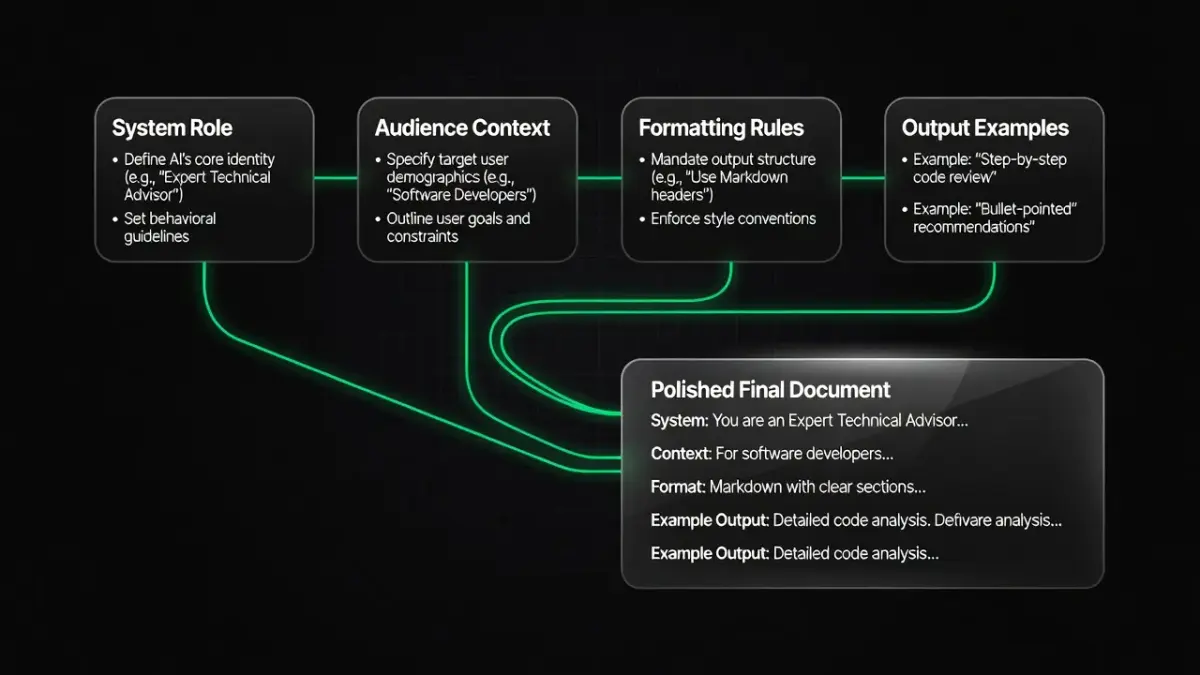
Content Creation Prompt Framework at a Glance
The table below outlines the five core steps required to engineer, test, and deploy production-ready AI content creation prompts, along with the estimated setup time and mandatory inputs for each phase.
| Step | Core Action | Realistic Time | Mandatory Input / Variable |
|---|---|---|---|
| 1. Define Persona & Goal | Set system instructions and expert background | 5 Minutes | Target reader profile, author tone, specific role |
| 2. Context & Constraints | Feed background facts, word counts, and forbidden terms | 10 Minutes | Product details, excluded buzzwords, target length |
| 3. Structure & Formatting | Specify markdown headers, tables, and short paragraphs | 5 Minutes | Desired layout, HTML/Markdown rules, list usage |
| 4. Few-Shot Examples | Paste high-performing reference text into the prompt | 10 Minutes | 1–2 gold-standard paragraphs or successful posts |
| 5. Iterative Refinement | Run edge-case tests and adjust instructions | 15 Minutes | AI response audit, targeted prompt tweaks |

Step 1: Establish the AI Persona and Expert Role
Setting an explicit expert role forces the AI model to draw from specific domain knowledge and adopt an appropriate tone. Without a designated persona, default model safety guardrails produce bland, generalized prose that reads like an introductory textbook.
To set the persona, begin your prompt with a direct directive:
"Act as a senior B2B content strategist with 10 years of experience in SaaS growth.""You are a technical editor specializing in simplifying complex financial compliance topics for small business owners."
By giving the model a defined perspective, you shape its vocabulary choice, sentence structure, and analytical depth before it writes a single word.
Step 2: Feed Target Audience Context and Structural Constraints
Providing background details and hard negative constraints prevents the AI from generating repetitive filler and generic marketing jargon. Models default to broad statements unless you establish boundary lines regarding what to include and what to avoid.
When drafting your context rules, focus on three distinct areas:
- Audience Nuance: State explicitly who the reader is, their sophistication level, and their immediate problem (e.g., "Write for busy agency directors who already understand basic SEO terminology").
- Negative Constraints: List banned phrases and filler words. According to OpenAI’s Official Prompt Engineering Guide, specifying explicit formatting requirements and clear exclusions drastically reduces hallucinated or off-topic outputs.
- Factual Grounding: Supply core facts, numbers, and product details upfront. As noted in our guide to writing AI tools for business growth, AI models perform best when synthesizing provided source data rather than pulling facts from baseline pre-training data.
Step 3: Mandate Formatting, Headers, and Output Scaffolding
Specifying structural rules like Markdown headings, bullet points, and sentence limits ensures the generated draft matches modern online reading habits. Unstructured prompts often yield massive blocks of text that look overwhelming on mobile devices.
Direct the model to adopt specific visual formatting rules:
- Heading Hierarchy: Demand
## H2and### H3subheadings structured around natural search questions. - Paragraph Length: Limit paragraphs strictly to 2–3 sentences to maintain visual rhythm.
- Data Callouts: Instruct the model to convert complex specs, comparisons, or timelines into clean Markdown tables.
Step 4: Add Few-Shot Examples for Tone Alignment
Providing one or two real-world examples (few-shot prompting) is the most reliable way to enforce exact style standards. AI models excel at pattern recognition; showing the desired end state works far better than describing it abstractly.
To execute few-shot prompting efficiently:
- Paste a top-performing paragraph from your blog or newsletter into the prompt.
- Label it clearly:
[EXAMPLE OUTPUT START]and[EXAMPLE OUTPUT END]. - Add the instruction:
"Match the tone, active voice, short sentence cadence, and formatting of the example above."
Step 5: Test, Audit, and Refine the Prompt Output
Auditing initial prompt outputs against edge cases helps you identify weak instructions and eliminate recurring stylistic flaws. Prompt development is an iterative process; early drafts rarely cover every scenario.
Review the output against three criteria:
- Fluff Check: Did the model insert forbidden phrases like "In today's fast-paced world" or "delve into"? Add those to your step 2 negative constraints.
- Directness: Did the text answer the heading's core question in the very first sentence? If not, instruct the prompt: "The first sentence under every heading must state the direct conclusion without preamble."
- Actionability: Is the advice concrete, or is it hidden behind passive descriptions?
What are the best AI prompts for content creation that experts recommend?
Subject matter experts recommend multi-step system prompts that define persona, background context, strict word-level constraints, and structural templates in a single structured block. Single-sentence instructions like "write a blog post about X" yield generic filler, whereas multi-layered master prompts generate publication-ready drafts.
A high-performing master prompt template used by experienced content strategists follows this exact syntax:
[ROLE]
Act as an expert B2B copywriter specializing in organic search acquisition.

[CONTEXT]
Target Audience: Founders of mid-sized e-commerce stores looking to lower customer acquisition costs.
Goal: Write an instructional guide explaining how to set up automated email cart-abandonment flows.

[CONSTRAINTS]
- Tone: Direct, practical, professional. No conversational filler ("Let's be real", "In today's world").
- Avoid words: elevate, leverage, key, crucial, delve, game-changer.
- Maximum 3 sentences per paragraph.
- Use active voice and write in the first person ("I recommend", "In my experience").

[OUTPUT FORMAT]
- Do not include an H1 title. Start directly with an opening answer paragraph.
- Use H2 headers for main steps.
- Include a summary Markdown table after the intro.
Using clear contextual delimiters like [ROLE] and [CONSTRAINTS] prevents the model from missing critical instructions during text generation.
What are some prompt engineering templates and examples for content creators?
Effective prompt templates use variable tags like {TOPIC}, {AUDIENCE}, and {FORMAT} to make single prompt structures reusable across multiple campaigns. Standardizing prompt syntax across your team reduces setup time while keeping published content consistent.
Here are three battle-tested templates tailored for specific content formats:
1. The Long-Form Article Prompt Template
"Act as an authority on {INDUSTRY}. Draft a 1,500-word instructional article explaining how to solve {PROBLEM} for {TARGET_AUDIENCE}. Structure the piece with H2 headings matching common sub-questions. Under each H2, state the direct answer in the first sentence. Include a Markdown table comparing {SOLUTION_A} vs {SOLUTION_B}. Avoid hype language."
2. The Social Media Thought-Leadership Prompt Template
"Reframe the key takeaways from the following article excerpt into a 5-bullet LinkedIn post: {PASTE_TEXT}. Opening line must be a counter-intuitive claim under 10 words. Focus heavily on practical steps. End with a question encouraging debate."
3. The Email Newsletter Lead-In Prompt Template
"Write a 200-word email newsletter opening introducing the concept of {TOPIC}. Target reader: {BUYER_PERSONA}. Highlight one major industry mistake and explain why it costs money. Keep paragraphs to two sentences maximum."
As highlighted in our content generation strategy execution guide, prompt templates perform best when paired with an overarching workflow that maps content directly to search intent.
Which FlowGPT prompts work best for content creation?
FlowGPT's top-rated content creation prompts focus on long-form SEO structuring, copy editing, and persona-driven creative writing. FlowGPT operates as a community-driven prompt directory where users vote on prompt templates based on their real-world output quality.
The highest-performing categories on FlowGPT for content marketers include:
- SEO Outline Generators: Community prompts configured to analyze top SERP results and produce outline structures designed to answer People-Also-Ask (PAA) queries.
- Humanizing Tone Modifiers: Prompts explicitly programmed to strip out robotic transitions, varied sentence lengths, and repetitive passive structures from existing drafts.
- Copywriting Framework Prompts: Templates built around classic sales frameworks like AIDA (Attention, Interest, Desire, Action) and PAS (Problem, Agitate, Solve).
When borrowing prompts from community repositories like FlowGPT, always audit the prompt for hardcoded assumptions. Many public prompts include unnecessary background fluff that consumes context window memory without improving the output.
What does the GitHub Awesome ChatGPT Prompts library offer for content creation?
The GitHub Awesome ChatGPT Prompts repository offers an open-source collection of system prompts that instantly convert AI models into specialized content creators, coders, and editors. Maintained on GitHub, this curated repository acts as a foundational standard for basic prompt roles.
For content creation, the repository provides pre-built role prompts such as:
- The Copywriter Prompt: Instructs the model to generate creative ad variants focused on specific emotional triggers.
- The Social Media Manager Prompt: Directs the model to adapt long-form text into platform-specific posts with relevant hashtag structures.
- The Editor / Proofreader Prompt: Forces the model to review submitted text strictly for grammatical accuracy, clarity, and tone alignment without altering the core message.
These open-source prompts serve as excellent building blocks. However, because they are generic by design, you must append your own brand guidelines, negative constraints, and target audience context to rank effectively in generative search engines. To understand how AI engines interpret structured text, explore our guide on AI optimization for generative search.
What content creation prompt examples does OpenAI provide?
OpenAI provides official prompt examples that emphasize clear instructions, structured output formats, explicit delimiters, and complex task decomposition. Detailed in the official OpenAI documentation, these developer-focused guidelines focus on prompt reliability and accuracy.
Key prompt examples recommended directly by OpenAI include:
- Summarization via Delimiters:
"Summarize the text enclosed in triple quotes into a 3-bullet executive summary: \"\"\"{INSERT_TEXT}\"\"\"" - Step-by-Step Chain-of-Thought Prompting:
"Before writing the blog post, list the top 3 arguments a skeptic would make against this topic. Then, address each argument within the body sections." - Output Schema Enforcement:
"Produce the output strictly in JSON format with the following keys: title, summary, key_takeaways."
Adopting OpenAI's official structural techniques - such as using triple quotes or XML tags to separate instructions from source text - prevents the model from confusing context data with execution commands.
Which prompt marketplaces, like PromptBase, sell the best content creation prompts?
Prompt marketplaces like PromptBase sell specialized content creation prompts engineered for complex multi-step tasks, niche industry copywriting, and hyper-realistic AI image generation. Platforms like PromptBase allow prompt engineers to monetize tested, complex prompts that consistently yield specific visual or written styles.
The main categories of content creation prompts available on commercial marketplaces include:
- Midjourney & DALL-E Image Prompts: Detailed text strings designed to produce high-end commercial photography, 3D renderings, and marketing vectors with consistent aesthetic styles.
- Niche Industry Copy Generators: Prompts tailored specifically to strict industries like real estate listings, legal marketing, or SaaS feature announcements.
- Comprehensive Content Systems: Multi-stage prompt workflows that guide an AI through outline creation, drafting, editing, and meta data generation.
While purchasing marketplace prompts can save initial research time, relying entirely on manual prompt execution creates operational bottlenecks as your publishing demands scale.
Moving Beyond Manual Prompting with PulseRank
While mastering manual prompt engineering allows you to generate individual blog posts and social captions, running a comprehensive search strategy requires far more than isolated text outputs. Managing keyword pools, mapping user intent, building internal links, creating custom visuals, and tracking rank position usually forces business owners into managing a chaotic stack of disconnected subscriptions.
This operational drag is precisely why we built PulseRank.
PULSERANK AUTOMATED ENGINE
- Keyword Pool Research
- 30-Day Content Strategy Plan
- Direct Engine Article & Image Generation
- Performance & AI Citation Tracking
The four stages run left to right in this order, each feeding into the next. Beneath stage 3 (Direct Engine Article & Image Generation), an arrow points down to a separate output: Direct Publishing: WordPress, Shopify, Wix, Git.
Instead of requiring you to write, paste, and iterate on dozens of individual prompts every day, PulseRank manages your business's complete organic content engine inside one automated platform:
- Automated Research & Strategy: PulseRank researches your specific brand keyword pool and automatically constructs an optimized 30-day content calendar.
- Citation-Ready Article Generation: Every article is written against the real sub-questions expanded by generative search engines, complete with formatted Markdown tables, verified external citations, and structured headers.
- Visuals & Publishing: Includes custom image generation with optimized alt text and automatically publishes direct to WordPress, Shopify, Wix, or Git repositories.
- Unified Analytics & GEO Tracking: Tracks your rankings via built-in Google Search Console performance views while simultaneously monitoring whether AI answer engines cite your domain.
Rather than juggling separate keyword research tools, prompt templates, and rank trackers, PulseRank delivers a complete end-to-end operation for a flat $499 per month.
Frequently Asked Questions
What is an AI prompt for content creation?
An AI prompt for content creation is a set of text instructions, constraints, and background details fed to Large Language Models (LLMs) to guide the generation of written or visual material. Effective prompts define the model's persona, target audience, structural formatting rules, and excluded terms to ensure high-quality output.
How do I write a prompt for an AI blog post?
Write an AI blog post prompt by providing a system role, clear topic context, audience profile, and structural guidelines. Instruct the model to use Markdown headers (## H2, ### H3), limit paragraphs to 3 sentences, answer questions directly in the first line of each section, and avoid fluff phrases like "in today's digital landscape."
What is the difference between single-shot and few-shot prompting?
Single-shot prompting provides the AI with instructions without showing any reference examples. Few-shot prompting includes one or more gold-standard text examples directly inside the prompt, allowing the model to analyze and mimic the exact tone, structure, and formatting of the reference material.
Are paid prompt marketplaces like PromptBase worth it?
Paid prompt marketplaces can be worth the investment for complex visual generation (such as Midjourney prompts) or hyper-specialized technical copy where manual engineering takes hours. However, for standard written content creation, learning basic structural prompt techniques yields comparable results without extra costs.
Can AI-generated content rank on Google in 2026?
Yes, AI-generated content can rank on Google and AI answer engines in 2026 provided it delivers high information gain, satisfies real search intent, and maintains rigorous factual accuracy. Search algorithms prioritize direct answers, structured data tables, verified third-party citations, and clear formatting regardless of whether text originates from human or AI assistance.
How do I stop AI models from using repetitive buzzwords in content?
Stop AI models from using buzzwords by including an explicit negative constraint block in your prompt. List specific banned terms such as "delve," "leverage," "game-changer," "crucial," and "unleash," and direct the model to substitute simple, direct nouns and active verbs instead.